
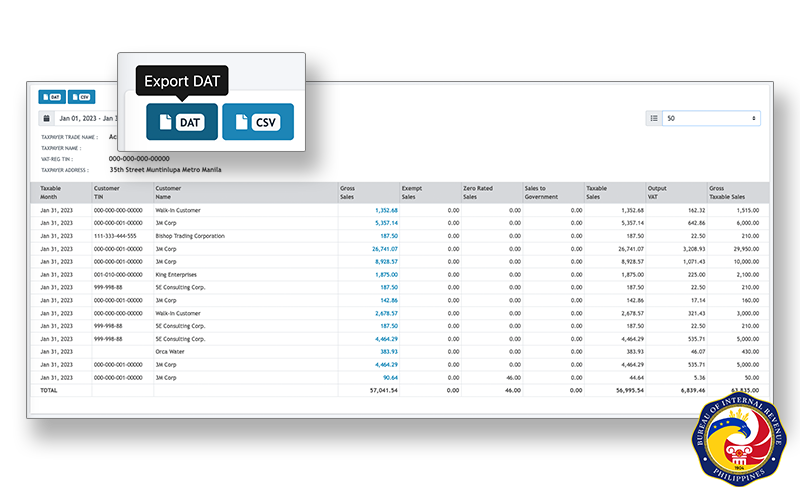
If you are VAT-registered in the Philippines, you have probably heard of SLS (Sales) and SLP (Purchases)—and the DAT files the BIR expects when you file your returns. For many small business owners, the stressful part is not the return itself but re-encoding sales and purchase data into the right format.
Here is a practical 2026 guide: what DAT files are, what you need before you export them, and how to generate them from clean books—without starting over in a separate spreadsheet every quarter.
What are SLS, SLP, and DAT files?
- SLS (Summary List of Sales) — summarizes your taxable sales for the period.
- SLP (Summary List of Purchases) — summarizes your taxable purchases for the period.
- DAT file — a BIR-prescribed electronic format used to submit SLS/SLP data (often through eFPS, eBIRForms, or your preparer’s workflow).
Your VAT return (for example Form 2550Q) must align with these lists. When sales and purchases in your books do not match what you upload, you risk follow-up questions, amended filings, or penalties.
Tip: Treat your accounting records as the single source of truth. If every invoice and purchase is recorded correctly during the month, DAT preparation becomes a review step—not a reconstruction project.
Who needs to prepare SLS/SLP DAT files?
You typically need them if you are:
- VAT-registered and filing periodic VAT returns
- Required to submit sales and purchase summaries with your compliance package
- Working with an accountant who requests DAT-ready files before filing
Non-VAT businesses focus on other returns (such as 2551Q for percentage tax). If you are unsure of your registration type, confirm your BIR Certificate of Registration (Form 2303) before you prepare the wrong package.
What you need before you generate a DAT file
Before exporting, make sure:
- Books are up to date — sales, purchases, receipts, and disbursements recorded for the quarter (or month, depending on your filing schedule).
- Tax codes and VAT treatment are correct — taxable, zero-rated, exempt, and out-of-scope transactions classified properly.
- Supplier and customer details are complete — TIN and registered name where required.
- Prior period is closed — no duplicate or missing invoice numbers across the period you are reporting.
For a deeper look at supported forms and books of accounts, see our BIR Forms & Reports page and the resource article How to simplify BIR reports preparation with Oojeema.
Step-by-step: generate BIR DAT files from your books
The exact menu names may vary by software, but the workflow is the same:
1. Record transactions during the period
Enter sales invoices, purchase entries, and adjustments as they happen—not only at quarter-end. This keeps your Sales Journal, Purchase Journal, and general ledger aligned.
2. Reconcile totals
Compare total taxable sales vs. your invoice register, taxable purchases vs. supplier invoices, and VAT on sales and purchases vs. what you expect on 2550Q. Fix gaps before you export.
3. Generate SLS and SLP (relief) reports
In Oojeema, open the BIR forms / tax reports area and generate the SLS/SLP (or VAT relief) reports for your chosen period. The system uses the transactions you already recorded—so you are not retyping rows into a separate template.
Related help: Know Your Taxes: SLSP on resources.oojeema.com.
4. Export the DAT file
From the same workflow, export the BIR-ready DAT file for sales and purchases as required. Download and keep a copy with your working papers (PDF summary + DAT + validation screenshots if your process requires them).
5. Validate before filing
- Spot-check a few high-value customers and suppliers on the list
- Compare summary VAT to your 2550Q draft
- Share the package with your accountant early if they file on your behalf
Tip: File a few days before the deadline so you have time to correct DAT validation errors without paying late penalties.
Common mistakes to avoid
- Re-encoding from spreadsheets — typos and version drift between books and DAT
- Missing purchase invoices — understated input VAT; mismatched 2550Q
- Wrong tax period — rejected upload or wrong quarter filed
- Ignoring credit memos / returns — overstated sales or purchases
- Last-minute-only bookkeeping — no time to fix classification errors
After you export: filing and record-keeping
- Upload or submit DAT files through your usual BIR channel (or via your tax practitioner).
- File 2550Q (and other required forms) for the same period.
- Store DAT files, summaries, and the filed return for at least 10 years (BIR record-keeping rules).
- Back up digital copies separate from your live accounting system.
How Oojeema fits in
Oojeema is built for Philippine tax rules: books of accounts, 2550Q, 2551Q, SLS/SLP, and automated DAT file generation from transactions you already recorded. You do not need to maintain a parallel spreadsheet just for the BIR.
- Explore features: BIR Forms & Reports
- Compare plans: Pricing
- Start a 14-day free trial and walk through one quarter with your accountant
For step-by-step product help, visit resources.oojeema.com → Taxes → Why 1 Minute is All you Need To Prepare BIR Forms.
This article is for general information only and is not tax advice. Rules change; confirm requirements with the BIR or your licensed tax professional.
